Step 7 - Customize the WAF policy
So far, we have been using the default NGINX App Protect policy. As you notices in the previous lab (Step 5), the nginx.conf does not file any reference to a WAF policy. It uses the default WAF policy.
In this lab, we will customize the policy and push a new config file to the docker container.
Use a custom WAF policy and assign it per location
Steps:
SSH to the Docker App Protect + Docker repo VM
In the
/home/ubuntudirectory, create a new folderpolicy-advmkdir policy-advCreate a new policy file named
policy_base.jsonand paste the content belowvi ./policy-adv/policy_base.json{ "name": "policy_name", "template": { "name": "POLICY_TEMPLATE_NGINX_BASE" }, "applicationLanguage": "utf-8", "enforcementMode": "blocking", "response-pages": [ { "responsePageType": "ajax", "ajaxEnabled": true, "ajaxPopupMessage": "My customized popup message! Your support ID is: <%TS.request.ID()%>" } ] }Create another policy file named
policy_mongo_linux_JSON.jsonand paste the content belowvi ./policy-adv/policy_mongo_linux_JSON.json{ "policy":{ "name":"evasions_enabled", "template":{ "name":"POLICY_TEMPLATE_NGINX_BASE" }, "applicationLanguage":"utf-8", "enforcementMode":"blocking", "blocking-settings":{ "violations":[ { "name":"VIOL_JSON_FORMAT", "alarm":true, "block":true }, { "name":"VIOL_EVASION", "alarm":true, "block":true }, { "name": "VIOL_ATTACK_SIGNATURE", "alarm": true, "block": true } ], "evasions":[ { "description":"Bad unescape", "enabled":true, "learn":false }, { "description":"Directory traversals", "enabled":true, "learn":false }, { "description":"Bare byte decoding", "enabled":true, "learn":false }, { "description":"Apache whitespace", "enabled":true, "learn":false }, { "description":"Multiple decoding", "enabled":true, "learn":false, "maxDecodingPasses":2 }, { "description":"IIS Unicode codepoints", "enabled":true, "learn":false }, { "description":"IIS backslashes", "enabled":true, "learn":false }, { "description":"%u decoding", "enabled":true, "learn":false } ] }, "json-profiles":[ { "defenseAttributes":{ "maximumTotalLengthOfJSONData":"any", "maximumArrayLength":"any", "maximumStructureDepth":"any", "maximumValueLength":"any", "tolerateJSONParsingWarnings":true }, "name":"Default", "handleJsonValuesAsParameters":false, "validationFiles":[ ], "description":"Default JSON Profile" } ], "signature-settings": { "attackSignatureFalsePositiveMode": "disabled", "minimumAccuracyForAutoAddedSignatures": "low" }, "server-technologies": [ { "serverTechnologyName": "MongoDB" }, { "serverTechnologyName": "Unix/Linux" }, { "serverTechnologyName": "PHP" } ] } }Note
you can notice the difference between the
baseand theadvancedpolicy.Now, create a new
nginx.confin thepolicy-advfolder. Do not overwrite the existing/etc/nginx/nginx.conffile, we need it for the next labs.vi ./policy-adv/nginx.confuser nginx; worker_processes 1; load_module modules/ngx_http_app_protect_module.so; error_log /var/log/nginx/error.log debug; events { worker_connections 1024; } http { include /etc/nginx/mime.types; default_type application/octet-stream; sendfile on; keepalive_timeout 65; server { listen 80; server_name localhost; proxy_http_version 1.1; app_protect_enable on; app_protect_security_log_enable on; app_protect_security_log "/etc/nginx/log-default.json" syslog:server=10.1.20.11:5144; location / { resolver 10.1.1.8:5353; resolver_timeout 5s; client_max_body_size 0; default_type text/html; app_protect_policy_file "/etc/nginx/policy/policy_base.json"; proxy_pass http://k8s.arcadia-finance.io:30274$request_uri; } location /files { resolver 10.1.1.8:5353; resolver_timeout 5s; client_max_body_size 0; default_type text/html; app_protect_policy_file "/etc/nginx/policy/policy_mongo_linux_JSON.json"; proxy_pass http://k8s.arcadia-finance.io:30274$request_uri; } location /api { resolver 10.1.1.8:5353; resolver_timeout 5s; client_max_body_size 0; default_type text/html; app_protect_policy_file "/etc/nginx/policy/policy_mongo_linux_JSON.json"; proxy_pass http://k8s.arcadia-finance.io:30274$request_uri; } location /app3 { resolver 10.1.1.8:5353; resolver_timeout 5s; client_max_body_size 0; default_type text/html; app_protect_policy_file "/etc/nginx/policy/policy_mongo_linux_JSON.json"; proxy_pass http://k8s.arcadia-finance.io:30274$request_uri; } } }Last step is to run a new container (and delete the previous one) referring to these 3 files.
docker rm -f app-protect docker run -dit --name app-protect -p 80:80 -v /home/ubuntu/policy-adv/nginx.conf:/etc/nginx/nginx.conf -v /home/ubuntu/policy-adv/policy_base.json:/etc/nginx/policy/policy_base.json -v /home/ubuntu/policy-adv/policy_mongo_linux_JSON.json:/etc/nginx/policy/policy_mongo_linux_JSON.json app-protect:20200316Check that the
app-protect:20200316container is runningdocker ps
RDP to the Jumhost as
user:userand click on bookmarkArcadia NAP DockerClick Login and use matt:ilovef5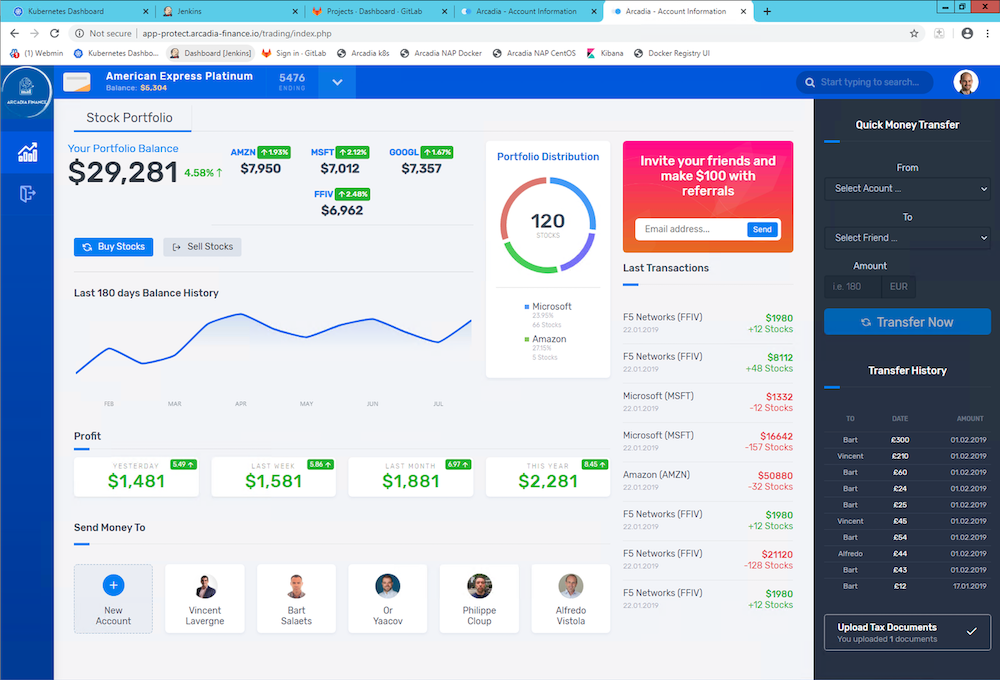
Note
From this point on, NAP is using a different WAF policy based on the requested URI:
policy_base for
/(the main app)policy_mongo_linux_JSON for
/files(the back end)policy_mongo_linux_JSON for
/api(the Money Transfer service)policy_mongo_linux_JSON for
/app3(the Refer Friend service)
Use External References to make your policy dynamic
External references in policy are defined as any code blocks that can be used as part of the policy without being explicitly pasted within the policy file. This means that you can have a set of pre-defined configurations for parts of the policy, and you can incorporate them as part of the policy by simply referencing them. This would save a lot of overhead having to concentrate everything into a single policy file.
A perfect use case for external references is when you wish to build a dynamic policy that depends on moving parts. You can have code create and populate specific files with the configuration relevant to your policy, and then compile the policy to include the latest version of these files, ensuring that your policy is always up-to-date when it comes to a constantly changing environment.
Note
To use the external references capability, in the policy file the direct property is replaced by “xxxReference” property, where xxx defines the replacement text for the property. For example, “modifications” section is replaced by “modificationsReference”.
In this lab, we will create a custom blocking page and host this page in Gitlab.
Note
In this configuration, we are completely satisfied with the basic base policy we created previously /policy-adv/policy_base.json, and we wish to use it as is. However, we wish to define a custom response page using an external file located on an HTTP web server (Gitlab). The external reference file contains our custom response page configuration.
As a reminder, this is the base policy we created:
{
    "name": "policy_name",
    "template": { "name": "POLICY_TEMPLATE_NGINX_BASE" },
    "applicationLanguage": "utf-8",
    "enforcementMode": "blocking",
    "response-pages": [
            {
                "responsePageType": "ajax",
                "ajaxEnabled": true,
                "ajaxPopupMessage": "My customized popup message! Your support ID is: <%TS.request.ID()%>"
            }
            ]
}
Steps :
RDP to
Jumphostand connect toGitLab(root / F5twister$)Click on the project named
NGINX App Protect / nap-reference-blocking-page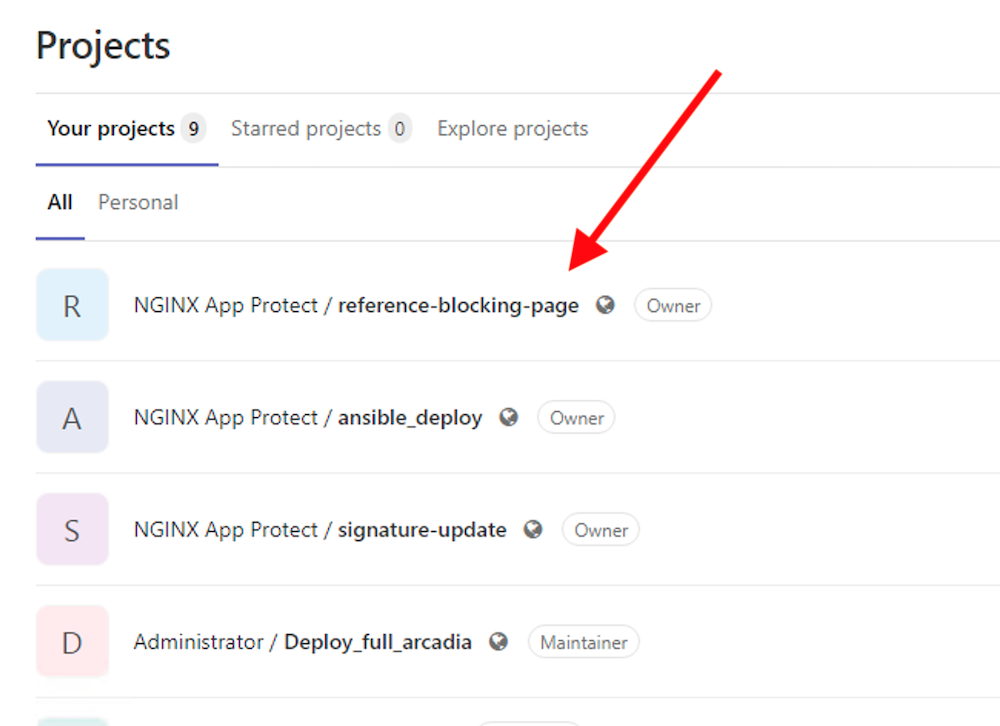
Check the file
blocking-custom-1.txt[ { "responseContent": "<html><head><title>Custom Reject Page</title></head><body><p>This is a <strong>custom response page</strong>, it is supposed to overwrite the default page for the <strong>base NAP policy. </strong></p><p>This page can be <strong>modified</strong> by a <strong>dedicated</strong> team, which does not have access to the WAF policy.<br /><br /></p><p><img src=https://media.giphy.com/media/12NUbkX6p4xOO4/giphy.gif></p><br>Your support ID is: <%TS.request.ID()%><br><br><a href='javascript:history.back();'>[Go Back]</a></body></html>", "responseHeader": "HTTP/1.1 302 OK\\r\\nCache-Control: no-cache\\r\\nPragma: no-cache\\r\\nConnection: close", "responseActionType": "custom", "responsePageType": "default" } ]
This is a custom Blocking Response config page. We will refer to it into the
policy_base.jsonSSH to
Docker App Protect + Docker repoVMDelete the running docker
docker rm -f app-protect
Modify the base policy created previously
vi ./policy-adv/policy_base.json
Modify the JSON as below
{
    "name": "policy_name",
    "template": { "name": "POLICY_TEMPLATE_NGINX_BASE" },
    "applicationLanguage": "utf-8",
    "enforcementMode": "blocking",
    "responsePageReference": {
        "link": "http://10.1.1.7/ngnix-app-protect/nap-reference-blocking-page/-/raw/master/blocking-custom-1.txt"
    }
}
Note
You can notice the reference to the TXT file in Gitlab
Run a new docker refering to this new JSON policy
docker run -dit --name app-protect -p 80:80 -v /home/ubuntu/policy-adv/nginx.conf:/etc/nginx/nginx.conf -v /home/ubuntu/policy-adv/policy_base.json:/etc/nginx/policy/policy_base.json -v /home/ubuntu/policy-adv/policy_mongo_linux_JSON.json:/etc/nginx/policy/policy_mongo_linux_JSON.json app-protect:tcIn the
Jumphost, openEdge Browserand connect toArcadia NAP DockerbookmarkEnter this URL with a XSS attack
http://app-protect.arcadia-finance.io/?a=<script>You can see your new custom blocking page
Extra lab if you have time - modify this page in Gitlab and run a new docker. The policy is modified accordingly without modifying the
./policy-adv/policy_base.jsonfile.
Create an OWASP Top 10 policy for NAP
So far, we created basic and custom policy (per location) and used external references. Now it is time to deploy an OWASP Top 10 policy. The policy not 100% OWASP Top 10 as several attacks can’t be blocked just with a negative policy, we will cover a big part of OWASP Top 10.
Steps:
SSH to the Docker App Protect + Docker repo VM
In the
/home/ubuntudirectory, create a new folderpolicy_owasp_top10mkdir policy_owasp_top10Create a new policy file named
policy_owasp_top10.jsonand paste the content belowvi ./policy_owasp_top10/policy_owasp_top10.json{ "policy": { "name": "Complete_OWASP_Top_Ten", "description": "A generic, OWASP Top 10 protection items v1.0", "template": { "name": "POLICY_TEMPLATE_NGINX_BASE" }, "enforcementMode":"blocking", "signature-settings":{ "signatureStaging": false, "minimumAccuracyForAutoAddedSignatures": "high" }, "caseInsensitive": true, "general": { "trustXff": true }, "data-guard": { "enabled": true }, "blocking-settings": { "violations": [ { "alarm": true, "block": true, "description": "Modified NAP cookie", "name": "VIOL_ASM_COOKIE_MODIFIED" }, { "alarm": true, "block": true, "description": "XML data does not comply with format settings", "name": "VIOL_XML_FORMAT" }, { "name": "VIOL_FILETYPE", "alarm": true, "block": true } ], "evasions": [ { "description": "Bad unescape", "enabled": true }, { "description": "Apache whitespace", "enabled": true }, { "description": "Bare byte decoding", "enabled": true }, { "description": "IIS Unicode codepoints", "enabled": true }, { "description": "IIS backslashes", "enabled": true }, { "description": "%u decoding", "enabled": true }, { "description": "Multiple decoding", "enabled": true, "maxDecodingPasses": 3 }, { "description": "Directory traversals", "enabled": true } ] }, "xml-profiles": [ { "name": "Default", "defenseAttributes": { "allowDTDs": false, "allowExternalReferences": false } } ] } }Note
Please have a quick look on this policy. You can notice several violations are enabled in order to cover the different OWASP categories
Now, create a new
nginx.confin thepolicy_owasp_top10folder. Do not overwrite the existing/etc/nginx/nginx.conffile, we need it for the next labs.vi ./policy_owasp_top10/nginx.confuser nginx; worker_processes 1; load_module modules/ngx_http_app_protect_module.so; error_log /var/log/nginx/error.log debug; events { worker_connections 1024; } http { include /etc/nginx/mime.types; default_type application/octet-stream; sendfile on; keepalive_timeout 65; server { listen 80; server_name localhost; proxy_http_version 1.1; app_protect_enable on; app_protect_security_log_enable on; app_protect_policy_file "/etc/nginx/policy/policy_owasp_top10.json"; app_protect_security_log "/etc/nginx/log-default.json" syslog:server=10.1.20.6:5144; location / { resolver 10.1.1.9; resolver_timeout 5s; client_max_body_size 0; default_type text/html; proxy_pass http://k8s.arcadia-finance.io:30274$request_uri; } } }Note
You can notice we get back to a very simple policy. This is what DevOps and DevSecOps expect when they deploy NAP. Simple policy for OWASP Top10 attacks.
Last step is to run a new container (and delete the previous one) referring to these new files for OWASP Top 10 protection.
docker rm -f app-protect
docker run -dit --name app-protect -p 80:80 -v /home/ubuntu/policy_owasp_top10/nginx.conf:/etc/nginx/nginx.conf -v /home/ubuntu/policy_owasp_top10/policy_owasp_top10.json:/etc/nginx/policy/policy_owasp_top10.json app-protect:20200316
Check that the
app-protect:20200316container is runningdocker ps
RDP to the Jumhost as
user:userand click on bookmarkArcadia NAP Docker
Video of this module (force HD 1080p in the video settings)